View and download your benefits information
You can find all the information you need to know about your benefits plan in your Digital Wallet. We explain the high-level details of your benefits plan directly in your Digital Wallet, but you can also view and download documents that go into more detail.
These documents might include a:
-
Benefits guide: A document League creates that summarizes information about all the benefits your employer offers.
-
Summary of Benefits Coverage (SBC): A document your insurance carrier creates to explain the most important details about what’s covered by your medical benefits.
-
Plan summary: A document your insurance carriers create to summarize what’s covered by other benefits (like vision, dental, life insurance, etc).
All these documents include key information like:
-
What each of your benefits cover
-
How much coverage each benefit offers
-
Information about cost sharing arrangements like deductibles, out-of-pocket maximums, copays, and coinsurance
View and download your benefits information
See instructions for:
On mobile
1. Tap “Wallet”.
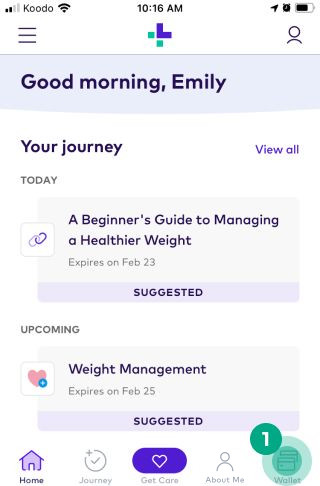
2. Select the benefit you want to view information for.
-2e8d923ab35ed3b2f38a78373f0f3293.jpeg)
3. Tap the document you want to view. This could be a “Benefits Guide”, “SBC”, or “Plan Summary”.
-f2f8041f14bca3b383a91ba161207e52.jpeg)
The document will now open on your mobile device. You can access these documents anytime in your Digital Wallet, or download them to your device.
On web
1. Click “Wallet”.
-203835e1fca929358f397d1c9ab2905c.jpeg)
2. Select the benefit you want to view information for.
-ef0f092bb1952f7e67279262f4d55659.jpeg)
3. Under “Actions”, click the document you want to view. This could be a “Benefits Guide”, “SBC”, or “Plan Summary”.
-980b210e7922e7320561697b340d6f2b.jpeg)
The document will now open in your browser. You can access these documents anytime in your Digital Wallet, or download them to your computer.